
Introduction
In today’s digital era, Online CNIC Verification in Pakistan has become essential for security, identity confirmation, SIM registration, bank account creation, and government services. The National Database & Registration Authority (NADRA) provides quick and reliable online systems that allow users to verify their Computerized National Identity Card (CNIC) without needing to visit offices.
This article provides a complete, SEO-optimized guide on how to check and verify a CNIC online in 2025 using NADRA’s official portals and SMS services.
What is Online CNIC Verification?
Online CNIC verification is a digital service that enables users to confirm the identity of a person by checking their registered details through NADRA. It is used for:
- SIM card verification
- Biometric verification
- Online registrations
- Govt welfare programs
- Bank KYC processes
- Preventing fraud and misuse
-
NADRA Online Verification System
NADRA offers multiple ways to verify a CNIC online:
NADRA Pak Identity Portal (Official Website)
The Pak Identity portal allows users to access identity-related services.
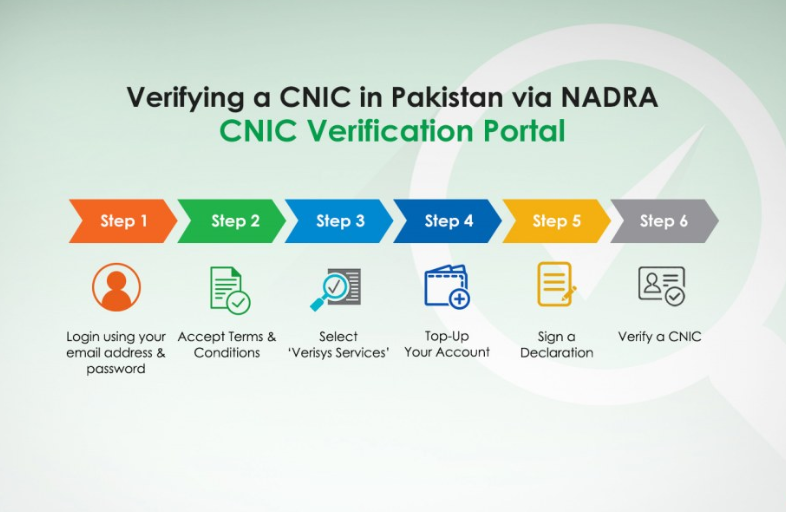
How to Verify Online CNIC Verification in Pakistan:
- Visit the Pak Identity website
- Create an account using your email and phone number
- Log in and access verification services
- Enter the CNIC number to check identity details
This is the most secure method and widely used for official documentation.
-
CNIC Verification Through SMS
NADRA also provides an SMS-based verification service.
Steps:
- Open Messages
- Type the CNIC number without hyphens
- Send to 7000
- You will receive the registered name of the CNIC holder
Example:
Send: 4210123456789 → 7000
This is one of the fastest ways to confirm identity.
-
CNIC Biometric Verification for SIM
To check how many SIM cards are registered against a CNIC:
- Visit cnic.sims.pk
- Enter CNIC number
- Verify through captcha
- View number of registered SIMs
This helps avoid fraud and illegal SIM usage.
-
Why Online CNIC Verification Is Important
- Stops identity theft
- Ensures security for transactions
- Required for banking and SIM registration
- Helps detect fake or expired CNICs
- Mandatory for government schemes
- Useful for employers verifying workers
-
Common Uses of CNIC Verification
- Ehsaas / BISP eligibility checks
- Online bank account opening
- Passport & visa processes
- Property ownership verification
- Job background checks
- Online shopping & delivery confirmation
-
Safety Tips for CNIC Verification
- Only use official NADRA portals
- Avoid sharing CNIC on unknown websites
- Keep SMS verification details private
- Use secure internet connection
- Never share CNIC photos with strange
Conclusion
Online CNIC Verification in Pakistan in Pakistan has made identity confirmation faster, more reliable, and safer. Whether you’re checking SIM registration, verifying an employee, or confirming your own identity, NADRA provides easy digital solutions for all users.
By following the methods above, you can quickly verify any CNIC online in 2025 without visiting physical offices.